Out now · iPhone + Mac · Serato DJ

MLT Mobile: Prep Your Serato Crates On Your Phone

Your crates, hot cues and loops on your iPhone. Build a crate on the bus, set cues on the sofa, put a set in order in the queue at the bar. Back home, press Sync and open Serato. It's all there.

  1. MLT on your Mac. Free, sign in or make an account.
  2. MLT Mobile on your iPhone. Free on the App Store.
  3. Pair them. Open MLT Mobile in MLT on your Mac.

Free · MLT on a Mac with Serato DJ Pro 4 or 5 · iPhone with iOS 17 or newer

Inside the app

Your library, in your pocket.

Real screens from MLT on iPhone.

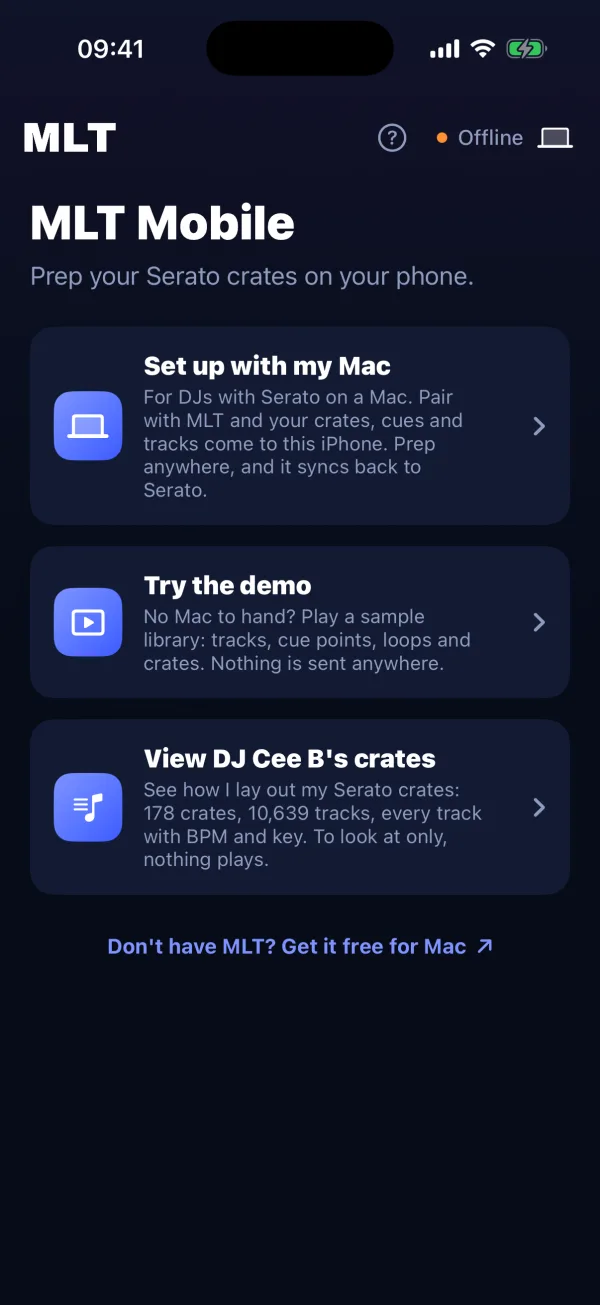
MLT on iPhone: Start here

Start here

Set up with MLT on your Mac, try the demo, or have a look at my crates. Each one says what it does.
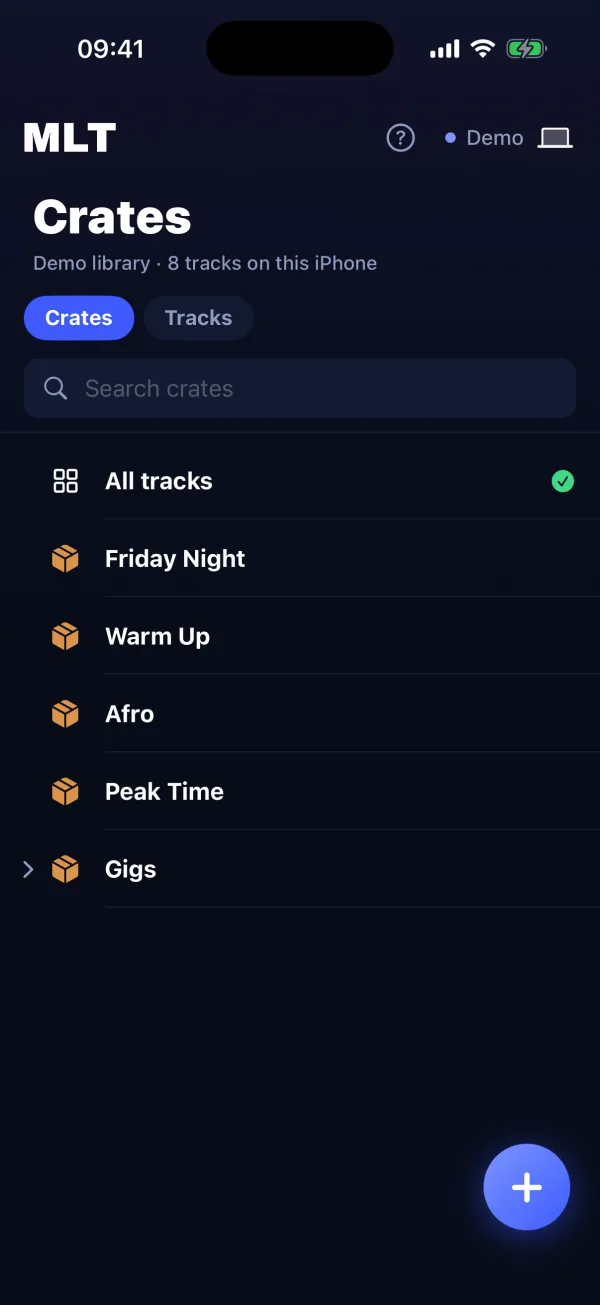
MLT on iPhone: Your crates

Your crates

Every crate and sub-crate from Serato, in the same order and nesting. Search crates or every track from one box.
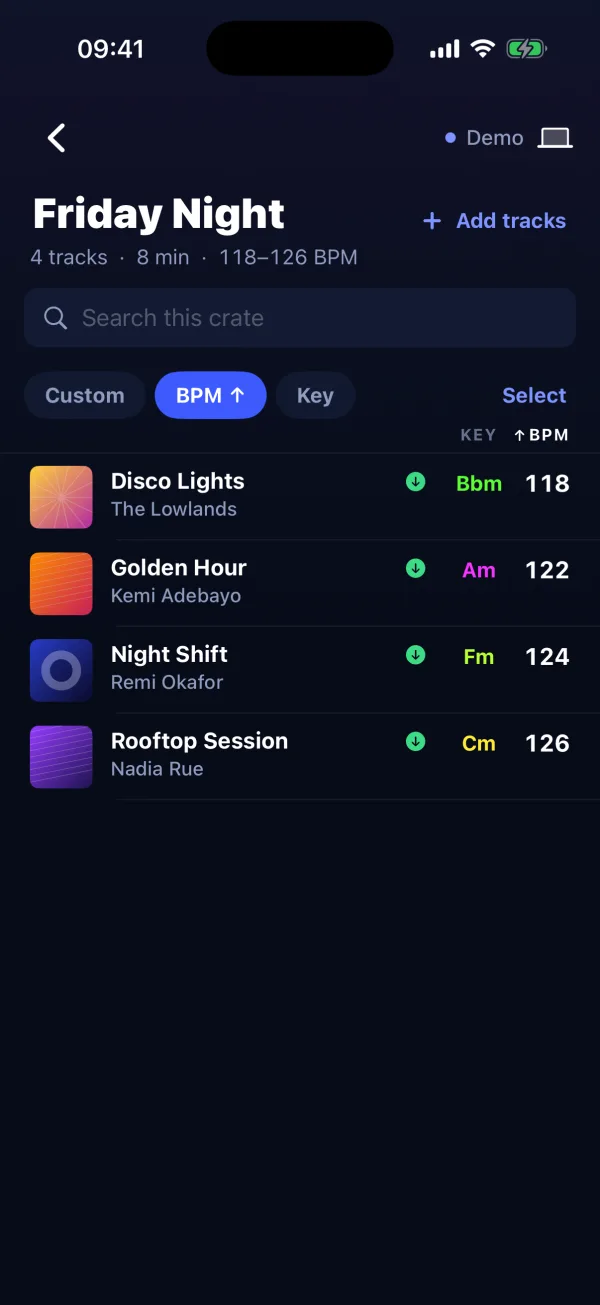
MLT on iPhone: Your tracks

Your tracks

BPM and key at a glance, full names (no cut-off "(Intro - Dirty)"). Sort by your Serato order, BPM or key.
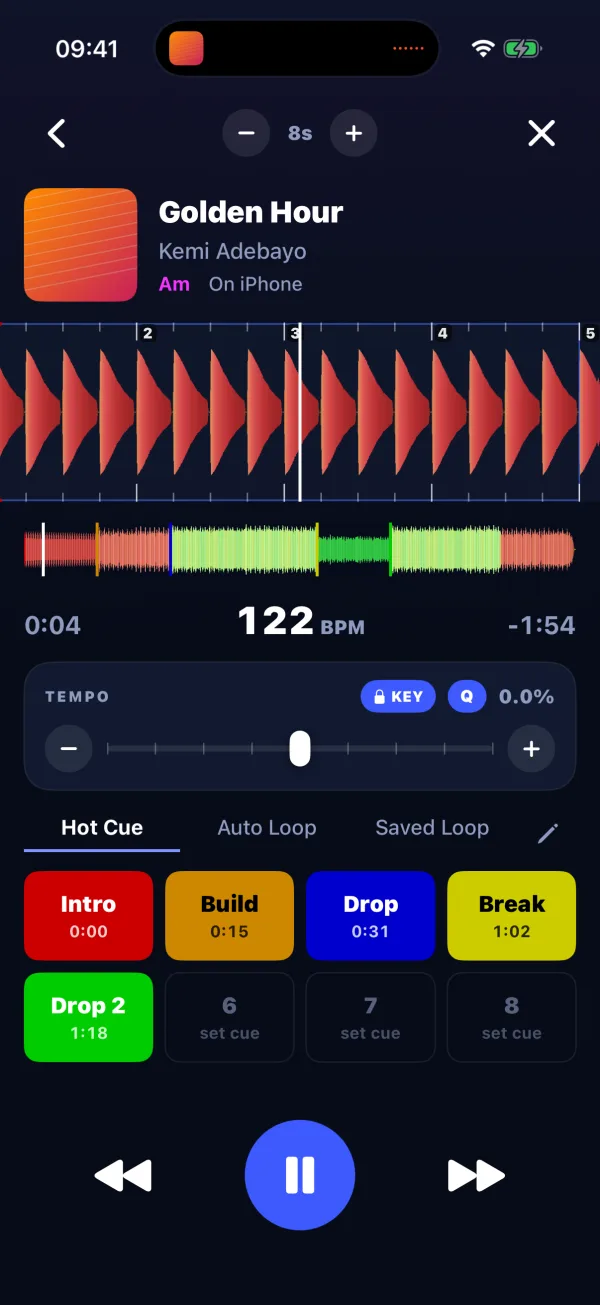
MLT on iPhone: The deck

The deck

A sharp waveform in Serato's colours, your hot cues and saved loops on pads, auto loops, and tempo with key lock.

MLT on iPhone: My crate layout

My crate layout

View DJ Cee B's crates: the way I lay out ALL GENRES and 2040 CRATES, right in the app.
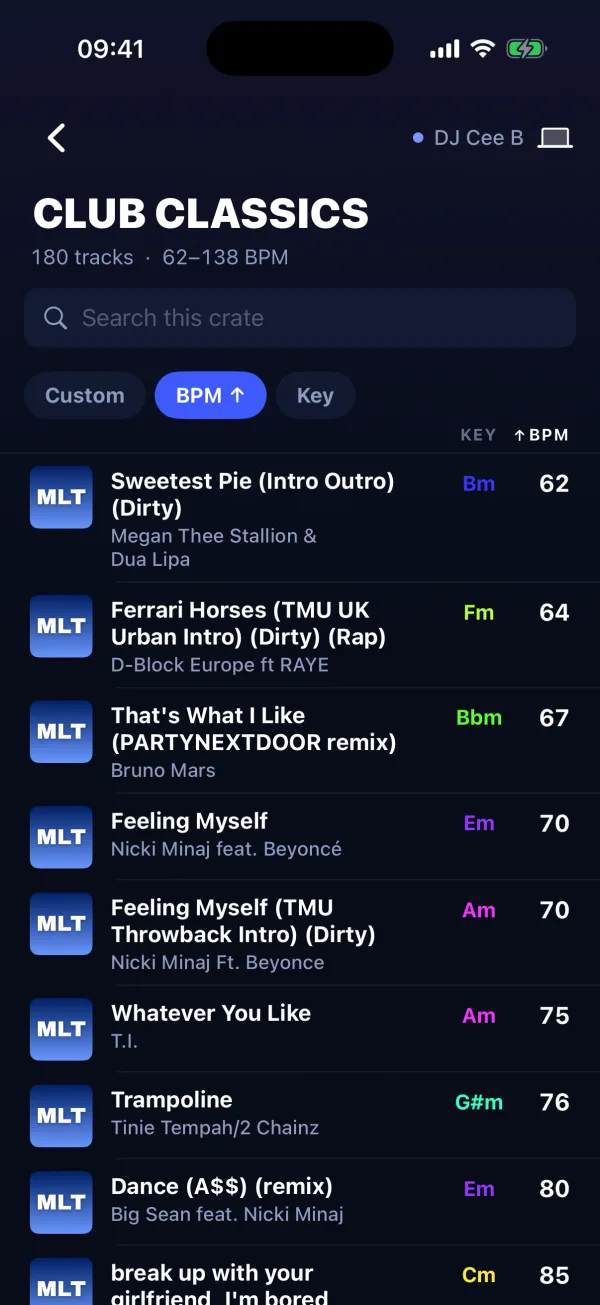
MLT on iPhone: Every track in it

Every track in it

178 crates, 10,639 tracks, every one with BPM and key. To look at only: nothing plays.

How it works

Prep on your phone. Play in Serato.

MLT on your Mac is the bridge: it sends your Serato library to your phone, and writes what you change on the phone back into Serato.

01

Pair once

Open MLT Mobile in MLT on your Mac. Your iPhone finds it on the same Wi-Fi: tap Pair, click Allow on the Mac. No codes to type, no cables.

02

Prep anywhere

Your crates come to the phone. At home tracks stream from your Mac; download any crate to play it anywhere. Make crates, reorder them, set cues and save loops.

03

Sync, then open Serato

Back at the laptop, press Sync on the phone. MLT writes your changes into Serato's library. Open Serato and your crates, cues and loops are there.

What it does

Serato prep, wherever you are.

Everything you change on the phone goes back into Serato when you sync, and what you change in Serato comes to the phone at the next Sync.

Every crate, as Serato has it

Crates, sub-crates and smart crates in the same order, with BPM, key and artwork. Tracks whose files are missing on your Mac are shown and counted apart, so you know what to fix.

Stream at home, download for anywhere

Near your Mac, any track plays straight from it at full quality. Download a crate, or everything, to play with no Mac at all. Downloads carry on with the phone locked.

A real deck

A sharp waveform in Serato's colours with numbered bars, your 8 hot cues and saved loops on pads, auto loops from 1/8 to 16 beats, and tempo with key lock.

Edit on the phone, sync to Serato

Set, rename and recolour hot cues, save loops, make crates, add or take out tracks and drag them into order. See exactly what changes before you tap Sync.

Every format

MP3, WAV, AIFF, M4A and FLAC. Cues and loops you set on the phone land in the file exactly where Serato looks for them.

No Wi-Fi? Connects directly

At home it uses your Wi-Fi. Backstage with no network, the phone and Mac connect directly, like AirDrop.

On your Mac

MLT Mobile lives in your menu bar.

After your first sync, turn on the menu bar icon. Click it for MLT Mobile's own window: no need to open the rest of MLT.
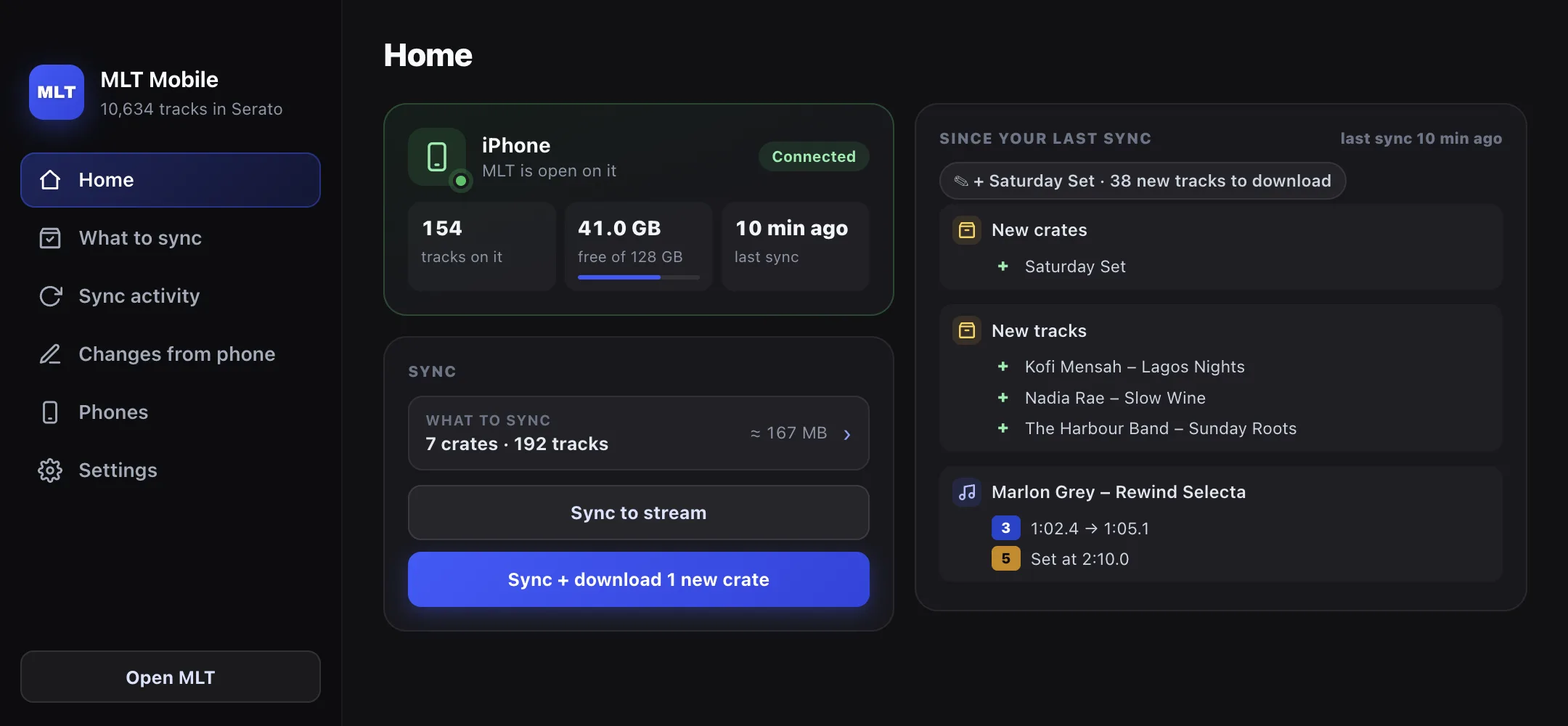
The MLT Mobile window on a Mac: the phone, Sync, and what changed in Serato since the last sync

Everything in one window

Your phone, Sync, what to sync, what changed, and changes coming back from the phone. Close MLT and it keeps running in the menu bar, and a notification tells you when changes from your phone are saved to Serato. It can start when your Mac starts, too.

See what's going before it goes

"Since your last sync" names every new crate and track, and every cue, loop or beatgrid you changed in Serato. Press Sync changes and it lists them again before anything is sent.

Pick your crates

Send the whole library or just the crates you tick. Add a crate later and only the tracks the phone doesn't have yet are downloaded. A genre or year change in your tags sends nothing.

In the app

See how I lay out my crates.

DJ Cee B's crates in MLT on iPhone

Open the app, tap View DJ Cee B's crates, and look around the layout I play out of: openers by era, the main set, every genre. 178 crates and 10,639 tracks, every one with its BPM and key.

It's there to look at: nothing plays, and nothing changes. No Mac needed.

Want it on paper? The crate layout pack has every crate as a PDF.

What you need

Before you start.

MLT on a MacFree. macOS 11 or newer, Apple Silicon or Intel. MLT Mobile isn't on Windows yet.
An iPhoneiOS 17 or newer. Only the crates you download take up space.
Serato DJ Pro 4 or 5Your library on that Mac. Open Serato once first, so it sets up its library.
Tracks on the MacTracks on external drives don't go to the phone yet.

Your library is safe

Built not to break Serato.

How changes get into Serato

  • Nothing goes to Serato until you review it on the phone and tap Sync.
  • MLT only writes while Serato is closed. If it's open, your changes wait and save when you quit it.
  • Every file and Serato's library database are backed up first, every time.
  • Your audio is never changed: only the cues, loops and crates you edited.
  • Taking a track out of a crate only takes it out of that crate. Nothing is ever deleted from your library.

Good to know

  • Nothing converts or downloads until you ask: Sync, play a track, or download a crate.
  • Changes you make in Serato reach the phone the next time you press Sync, so your phone never changes under you mid-prep.
  • The Mac pauses work while Serato is open, so it never slows down a set.
  • Downloads are fastest with MLT open on the phone. Locked or in another app, iPhone slows them right down; the Mac tells you, and it catches up when you're back.
  • MLT needs to be open on the Mac for the phone to sync. Downloaded crates play on their own.
  • Missing or damaged files are listed on the Mac, with Missing Tracks one click away.

FAQs

Questions.

Is MLT Mobile free?
Yes. The iPhone app and MLT Mobile in MLT for Mac are both free.
Do I need a Mac?
For your own library, yes: MLT on your Mac sends it to the phone and writes your changes back into Serato. Without a Mac you can still try the demo library or view my crates in the app.
Does it work on Windows?
Not yet. MLT Mobile needs MLT on a Mac for now.
Does it work with an external drive?
Not yet. MLT Mobile works with the Serato library on your Mac, so tracks on an external drive don't go to the phone. If your library lives on a drive, MLT Mobile tells you and won't open until MLT is set to the library on your Mac. Drive support is next on the list.
Does MLT Mobile change my music files?
Only the cues and loops you sync from the phone, after a backup, while Serato is closed. The audio itself is never touched. Downloads on the phone are separate copies.
How much space does it take on my phone?
Only what you download. Streaming from your Mac takes no space, and the app shows each crate's size before you download it.
Can MLT Mobile delete tracks from my Serato library?
No. Taking a track out of a crate on the phone only takes it out of that crate. The track stays in your library and in its other crates. Deleting from your library is only ever done by you, in Serato.
What if I change the same track in Serato and on the phone?
MLT merges them pad by pad: a cue changed only in Serato keeps Serato's version, one changed only on the phone keeps the phone's. If the same pad changed on both, the phone warns you first, then its version is saved and Serato's stays in a backup. You see what's going to Serato before anything is written.
How long does it take to download my library?
In my tests, about 3,000 tracks reached an empty iPhone in around a quarter of an hour, with MLT open on the phone and on the same Wi-Fi as the Mac. After that, a Sync only sends what's new or changed.
Can I lock my phone while it downloads?
Yes, downloads carry on. iPhone slows them right down in the background though, so a big download is much quicker with MLT left open on screen. The Mac says when your phone is locked or in another app.
What if a file won't convert?
A damaged file that macOS can't read is named on the Mac and on the phone, and the rest of the sync carries on. Replace the file with a good copy and the next Sync sends it.
Can I use it at a gig with no internet?
Yes. Downloaded crates play and edit with no connection at all. Your edits wait on the phone and go to Serato the next time you sync.

Prep anywhere. Play in Serato.

MLT Mobile is free on the App Store. You need MLT on your Mac too, also free.